
Appearance
SHACL UI conformance in development
In development
SHACL UI support and the elody: ontology are in development and not part of a release yet. The platform changes they rely on are on feature branches of baseGraphql, the PWA and collection-api; elody-ontology (0.2.0) and elody-generator are new, and no client uses them yet. Terms, results and these pages may still change.
This page states, feature by feature, what Elody supports of SHACL 1.2 UI. It follows the feature set proposed to the W3C Data Shapes Working Group in w3c/data-shapes#1173: 36 features, each proposed as Required, Recommended or Optional. The working group discusses that a conformance claim should always say which features it covers (#1164); this table is that list for Elody.
Status
The SHACL 1.2 UI specification is a W3C Editor's Draft and has no conformance section yet. The feature set and its levels are a proposal (pull request #1173, open), and the working group votes on how conformance is defined (#1304). The results below are measured against the Editor's Draft of 2 October 2026.
Several results depend on platform changes that are not released yet: languageIn and form sections in baseGraphql and the PWA, the fix that keeps the language of metadata items when they are read, and relation mirroring in collection-api (with DiSHACLed's opt-in), and the label of related entities by preference order and language in baseGraphql. Until those are merged, rows 1, 4, 13 (create forms), 21, 22, 30, 31 and 32 hold on those branches only. Values read live from a SPARQL endpoint (shui:searchQuery, the live shui:SubClassEditor) need the query-driven SPARQL sources in collection-api, also not released yet.
Claim
Elody builds its interface from SHACL 1.2 UI shapes and supports all Required features of the proposed feature set. Inverse paths (31, 32) need relation mirroring, which an entity type switches on in its object configuration; multilingual editing (21, 22) needs the client's multilingual feature; the label of a related entity in the reader's language (4) needs the client's relationLabelsInPreferredLanguage feature, off by default so that existing clients keep their labels.
| Level | Supported | In part | Not supported |
|---|---|---|---|
| Required (20) | 20 | 0 | 0 |
| Recommended (13) | 5 | 3 | 5 |
| Optional (3) | 0 | 1 | 2 |
How Elody renders SHACL UI
Elody does not interpret shapes in the browser. Shapes become an Elody declaration (fromShacl), the declaration is generated into the GraphQL documents that drive the PWA (elody-ui generate), and the PWA renders those. The widget choice, labels, order and groups are therefore decided when generating, by the specification's own algorithms; values and languages are resolved at run time. See SHACL UI in Elody for the pipeline.
Features
| # | Feature | Level | Elody | How |
|---|---|---|---|---|
| 1 | Language preference via sh:languageIn | Required | ✅ | Labels: every translation bundle gets the text in the sh:languageIn order first. Values: the field carries languageIn; the PWA shows the first declared language that has a value, before the interface language, and offers only those languages. |
| 2 | Application and browser language preference | Recommended | ◐ | The application language is the language chosen in Elody (the interface language and the field's language selector, a UI feature the specification names), used after sh:languageIn, tags matched by RFC 4647 basic filtering; shui:languagePreference is the fallback order of the label texts. The browser's languages are not used as a default. |
| 3 | Cross-language fallback | Optional | ◐ | Labels fall back to the default bundle (English). A value without a text in the selected language shows empty. |
| 4 | Label resolution | Required | ✅ | Property labels: the label properties (shui:labelPreference, default sh:name) on the property shape, then on the predicate in the data graph and in the shapes graph, then the predicate's local name; resolved when generating, every language into the translation bundles. Value nodes: a related entity by the shui:LabelRole property of its class's node shape, then the label properties (default rdfs:label), then Elody's title and name, each in the preferred language (with the client feature relationLabelsInPreferredLanguage; without it the first value), then the local name of its IRI; the IRIs of an sh:in list by their labels in the shapes graph, else their local name. |
| 5 | Local name humanization | Recommended | ❌ | The local name is shown as it is (givenName). |
| 6 | Direct role annotation | Required | ✅ | shui:propertyRole shui:LabelRole makes the property the card title. |
| 7 | Qualified role annotation | Recommended | ✅ | Qualified roles set the precedence by sh:order; RDF 1.2 triple annotations are read and written in the RDF 1.1 qualified form. |
| 8 | Explicit sh:order | Required | ✅ | On property shapes and property groups, in detail panels and create forms. |
| 9 | Default order configuration | Required | ✅ | shui:defaultOrder of the global shui:Configuration. |
| 10 | Unordered-member fallback | Recommended | ✅ | Members without an order come after those with one. |
| 11 | Deterministic tie-breaking | Required | ✅ | Identical inputs give identical documents; elody-ui check fails the build on any drift. |
| 12 | Standard tie-breaking algorithm | Recommended | ◐ | Ties are broken by the metadata key, then the identifier, not by the resolved label. |
| 13 | Grouping (sh:group) | Required | ✅ | A group is a panel on the detail page and a titled section of the create form; ungrouped properties stay ungrouped. |
| 14 | Nested groups | Recommended | ❌ | Panels and form sections are one level deep. |
| 15 | IRI values — view | Required | ✅ | A related Elody entity by its label, shui:HyperlinkViewer as a link, any other IRI as text. |
| 16 | IRI values — edit | Required | ✅ | shui:IRIEditor as a text field; shui:InstancesSelectEditor and shui:AutoCompleteEditor as a relation dropdown on the sh:class; shui:SubClassEditor as a dropdown of sh:rootClass and its subclasses in the shapes and data graph, read when generating, or live from an endpoint (elody:classSource); shui:searchQuery against the endpoint of its SERVICE block as a relation dropdown that searches it. |
| 17 | Blank node values — view | Required | ✅ | A blank node with a nested shape (sh:node, shui:DetailsViewer) as a table, one column per nested property. |
| 18 | Blank node values — edit | Required | ✅ | shui:DetailsEditor as a field with sub-fields (inputFieldWithSubFields). A blank node inside a nested value is entered as text. |
| 19 | Literal values — view | Required | ✅ | xsd:string, boolean, integer, decimal, double, float, date, dateTime. |
| 20 | Literal values — edit | Required | ✅ | Text field, check box, number field, date and date-time picker, chosen by the scoring system; text with several values (no sh:maxCount 1) is one field holding the list; all eight types are kept with their type on save (round trip below). |
| 21 | Language-tagged strings — view | Required | ✅ | One multilingual field: the value per language, with a language selector. |
| 22 | Language-tagged strings — edit | Required | ✅ | Edited per language; the language is chosen from the sh:languageIn list, else from the client's interface languages. |
| 23 | HTML values — view | Recommended | ✅ | rdf:HTML and shui:HTMLViewer are Elody's rich-text element (tiptap) inside the detail panel, at the property's place, on its metadata key. |
| 24 | HTML values — edit | Recommended | ✅ | shui:RichTextEditor: the same element, edited in the detail page's edit mode. The create form has no rich-text field: an HTML property is filled in on the detail page after creating the entity. |
| 25 | Image values — view | Recommended | ◐ | Images that are Elody media files; not arbitrary image IRIs. |
| 26 | Widget scoring | Required | ✅ | The specification's scoring system on the working group's own scoring graph. |
| 27 | Default widget selection | Recommended | ✅ | The highest-scoring widget Elody implements. |
| 28 | Declared widgets | Required | ✅ | shui:editor and shui:viewer score 40 and win; Elody's own widgets are shui:Editor and shui:Viewer instances. |
| 29 | Widget switching | Optional | ❌ | The widget is fixed per field. |
| 30 | Value preservation | Required | ✅ | Existing values are shown, including unbounded ones, and a save keeps every value it does not change, every language and each value's type (round trip below). Values of an unbounded property are a set: collection-api stores them sorted. |
| 31 | Predicate and inverse paths — view | Required | ✅ | A predicate path is a metadata key or a relation. An inverse path reads the mirrored relation on the entity (is<X>For). collection-api keeps mirrors on its classic storage path; an entity type with an object configuration switches them on with RelationMirroring (DiSHACLed's entity does). |
| 32 | Predicate and inverse paths — edit | Required | ✅ | Predicate paths and, with sh:class, inverse paths are edited on the detail page and in the create form with a relation dropdown. Without sh:class Elody has no type to search: the create form takes the IRI typed in (as shui:IRIEditor), stored as the relation's key, and the detail page shows the related entity by its label. Adding or removing an inverse-path value updates the mirror on the other entity (round trip below), with the same condition as 31. |
| 33 | Alternative paths — view | Recommended | ❌ | Left out by choice: Elody keeps view and edit symmetric, which the specification allows for complex paths in view mode (see complex paths). |
| 34 | Alternative paths — edit | Recommended | ❌ | Follows from 33: a field Elody does not show, it does not edit. |
| 35 | Complex paths — view | Recommended | ❌ | As 33. |
| 36 | Complex paths — edit | Optional | ❌ | As 33; the specification makes it optional because a change along such a path is ambiguous. |
✅ supported · ◐ in part · ❌ not supported
Evidence
Every ✅ is backed by a test that runs in elody-generator:
- The specification's examples. All 34 examples of the Editor's Draft go through the whole pipeline; the spec examples page shows the declaration, the GraphQL, the result of baseGraphql's own resolvers and a screenshot for each. 31 render fully, none in part, and 3 are left out by choice (alternative and complex paths).
- Unit tests for each feature: scoring on the official scoring graph, ordering, groups and form sections, roles,
sh:languageIn, multilingual and nested fields, inverse paths, editable panels, rich text and related-entity lists in a panel,shui:SubClassEditor, and values from a linked-data source. collection-api has its own for the SPARQL engine's query-driven sources and forSPARQL_SOURCES. - The value-preservation round trip (
scripts/roundtrip/roundtrip.sh): collection-api stores an entity with values of all eight literal types, an unbounded property, a text in three languages, a value no form shows, and relations to three entities through an inverse and a predicate path (two relation types to one entity); baseGraphql reads it, the PWA's own form code saves it from the detail page with a metadata edit and a relation edit, and the stored entity and every related entity must equal the original plus those edits, on both sides of each relation. The related entities carry a title in two languages; the page must show the one in the reading language.
A related-entity table in a running client
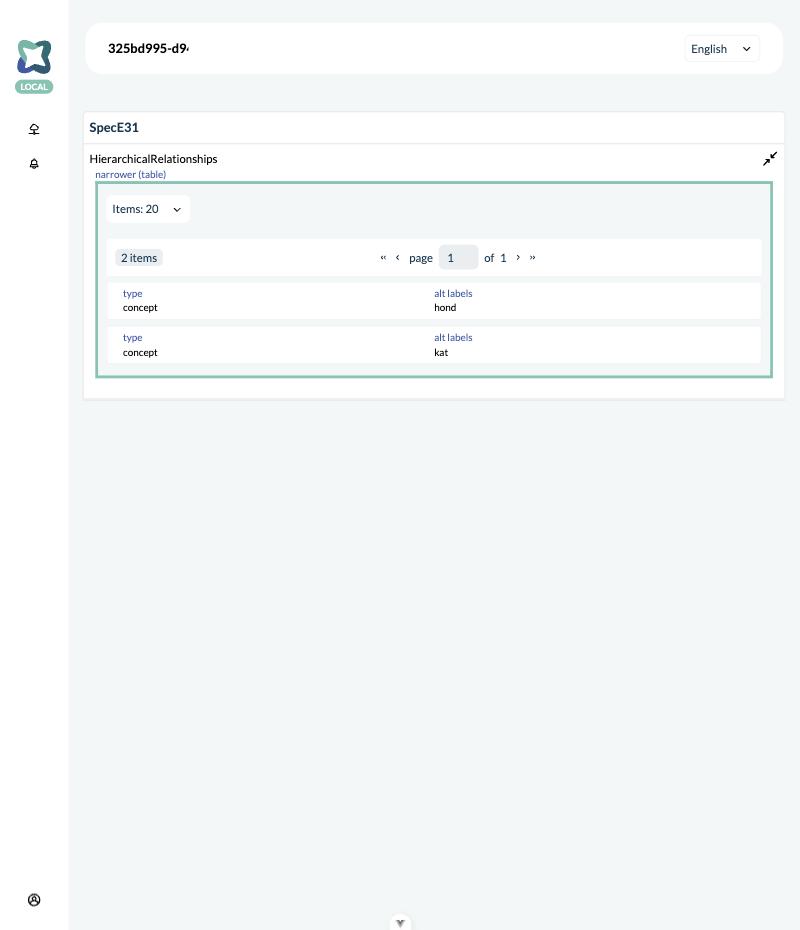
Storybook has no collection behind it, so example 31's list of related entities was also checked in a running DiSHACLed client with real data: three concepts, one with an isBroaderFor relation to the other two. The detail page lists exactly those two, with the columns of the sh:node shape (the type and the alternative labels), and each row opens that concept.
Values from a linked-data source in a running client
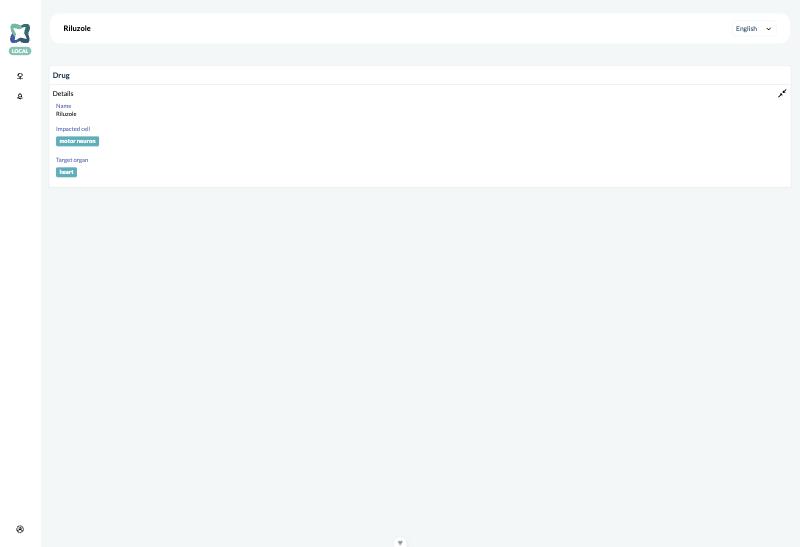
shui:searchQuery and the live shui:SubClassEditor were checked in a running DiSHACLed client against Ubergraph: searches through the GraphQL query the dropdown sends return the Cell Ontology's and Uberon's classes, and a drug linked to them shows them by their label (see linked-data sources). Typing in the dropdown in edit mode was not exercised in the browser.
Open points for the specification
Points that came up while measuring, worth raising with the working group:
- Language resolution lets
sh:languageInwin over the application's language, while the specification's own example says the French label is shown "unless the application has been configured to use a different language". Elody follows the normative text. - The scoring graph's permissible-datatype scores test
sh:datatypewithsh:hasValue, so a property whosesh:datatypeis a list gets no datatype score (see SHACL UI in Elody). - Label property resolution makes
sh:namethe default for property labels in every step, so a predicate'srdfs:labelin an ontology is only used whenshui:labelPreferencelists it. Most vocabularies label predicates withrdfs:label; a default ofsh:nameon the property shape andrdfs:labelon the predicate may be what is meant. Elody follows the text. - Build-time generators such as Elody cannot be tested by rendering the shapes in a browser; a conformance test on an abstract rendering model (#1165) would cover them.