
Appearance
SHACL UI in Elody in development
In development
SHACL UI support and the elody: ontology are in development and not part of a release yet. The platform changes they rely on are on feature branches of baseGraphql, the PWA and collection-api; elody-ontology (0.2.0) and elody-generator are new, and no client uses them yet. Terms, results and these pages may still change.
Elody can build its user interface from a SHACL 1.2 UI description. A set of SHACL shapes — written for Elody or taken unchanged from an external application profile — becomes an Elody declaration in Turtle, the declaration is generated into the GraphQL documents that drive the PWA, and the PWA renders them like any hand-written client.
This page explains that pipeline and what it supports. The spec examples page runs every example of the SHACL 1.2 UI specification through it and shows what Elody renders for each one. The conformance page states, feature by feature, which parts of SHACL 1.2 UI Elody supports.
Status
Developed for the DiSHACLed project (WP3) under epic #165964. The SHACL 1.2 UI specification is a W3C Editor's Draft; the results here were measured against the draft of 2 October 2026.
The pipeline
- SHACL UI shapes. Node shapes, property shapes and property groups, with
sh:constraints and, where the author wants,shui:editors and viewers. - Elody declaration.
fromShaclreuses the property shapes as they are and adds what the platform needs around them: anelody:EntityUi, a view mode, the property groups as detail panels, and a create form over the same property shapes. The result is a*.ui.ttlfile a client keeps, edits and commits. - GraphQL.
elody-ui generateturns the declaration into the client's query documents, the custom input fields for dropdowns, and the label texts for the translation bundles.elody-ui checkfails the build when a document drifts from the declaration or the declaration breaks the profile. - baseGraphql. The documents are ordinary Elody documents: the same resolvers execute them as for any client.
- PWA. The create form and the detail page render with the standard components (
DynamicForm,EntityElementWindow).
The declaration is the step a person looks at. Everything after it is generated and checked in CI.
What is supported
| Area | Standard terms | In Elody |
|---|---|---|
| Widget choice | shui:editor, shui:viewer, the scoring system | The spec's scoring system, run on the W3C working group's own scoring graph. An explicit shui:editor wins (score 40); otherwise the widget follows from sh:datatype, sh:in, sh:class, sh:node, sh:nodeKind and sh:singleLine. |
| Editors | text field, text area, text with language, number, boolean, date, date and time, IRI, enum select, instances select, auto complete, details | Each maps to an Elody input type. sh:in and sh:class become generated custom input fields: a dropdown with the listed options, or a relation dropdown on the class. shui:SubClassEditor is a dropdown of sh:rootClass and its subclasses (rdfs:subClassOf*) found in the shapes and data graph, in tree order with each level indented; the value is the class IRI. Like sh:in it is read when generating: a new subclass needs a new generation. With elody:classSource <endpoint> the class tree is read live from that endpoint instead (see linked-data sources). |
| Language-tagged text | rdf:langString, shui:TextFieldWithLangEditor, shui:TextAreaWithLangEditor | One multilingual field (isMultilingual): the detail page edits and shows it per language, the create form stores the text in the interface language. The client needs the supportsMultilingualMetadataEditing feature. |
| Nested shapes | sh:node with shui:DetailsEditor | A field with sub-fields (inputFieldWithSubFields): the value is a list of objects under the metadata key, one column per property shape of the nested node shape, in the create form and on the detail page. A related resource (sh:class) inside a nested value is entered as its identifier. |
| Viewers | literal, hyperlink, language string, details | Elody's metadata display and its link formatter. Elody's own pill and regular-expression formatters are shui:Viewer instances in the elody: ontology. |
| Rich text and related entities in a panel | rdf:HTML, shui:HTMLViewer, shui:RichTextEditor, shui:ValueTableViewer | Widgets Elody implements as an element inside the detail panel, at the property's place among the metadata fields (elody:panelElement). HTML is Elody's rich-text editor (tiptap, wysiwygElement) on the metadata key: shown in view mode, edited in edit mode; the create form has no rich-text field, so an HTML property is filled in on the detail page. shui:ValueTableViewer lists the entities the relation points to (entityListElement, with a generated filter on that relation); of the sh:node shape's columns, the value itself is the list item and the others are the related type's teaser, rdf:type its Elody type. |
| Labels | sh:name, shui:labelPreference, rdfs:label on groups and values, shui:LabelRole | Property labels follow the spec's chain: the label properties (shui:labelPreference, default sh:name) on the property shape, then on the predicate in the data and the shapes graph, then the predicate's local name. They are resolved when generating and go, in every language, to the client's translation bundles under an Elody translation key. A related entity is labelled by the shui:LabelRole property of its class's node shape, then the label properties (default rdfs:label), then Elody's title and name, in the reading language, else by the local name of its IRI. The reading language needs the client feature relationLabelsInPreferredLanguage (off by default; without it a related entity shows the first value of its label); the IRIs of an sh:in list by their labels in the shapes graph. |
| Ordering | sh:order, sh:group, shui:defaultOrder | Groups and ungrouped properties in one sequence, unordered last, ties by metadata key, then identifier; shui:defaultOrder from the global configuration. |
| Groups | sh:PropertyGroup | Each group is a panel on the detail page and a titled section of the create form (formSection). Groups and ungrouped properties are one sequence; an ungrouped property stays a plain form field and is shown in a "Details" panel (elody:showsUngrouped). |
| Paths | predicate paths, sh:inversePath | A predicate path is a metadata key, or a relation when the values are instances of a class (sh:class, relation has<X>). An inverse path is the mirrored relation on the entity (is<X>For): shown on the detail page by the related entity's label; in the create form a relation dropdown when the shape has sh:class, else a field where the IRI is typed in (as shui:IRIEditor), stored as the relation's key. collection-api keeps that mirror on its classic storage path; an entity type with an object configuration switches it on with RelationMirroring (see conformance, rows 31 and 32). elody:relationType names the relation when the client uses another name; elody:valueLabelKey the related entity's label metadata. |
| Language preference | sh:languageIn | The spec's order: the label and the value in the first language of sh:languageIn that has one, then the interface language. Labels are resolved when generating (every translation bundle gets the text in that order); values in the PWA, which also offers only the declared languages in the field's language selector. Tags match by basic filtering (en-US for en). |
| Editing and value preservation | dash:readOnly, sh:minCount | The detail panels are editable: each writable property is edited with the create form's widget, and a save writes back only what changed. Values the form does not show, every language of a multilingual field and the values of an unbounded property are kept, each in its own type. Relation-valued properties (with sh:class, also behind an inverse path) are edited with the same relation dropdown as in the create form, and a change updates the mirrored relation on the other entity; dash:readOnly keeps a property read-only. |
| Cardinality | sh:minCount, sh:maxCount | sh:minCount 1 makes a field required. A property without sh:maxCount 1 may hold several values: a text property becomes a field holding a list of texts, new values typed in (SHACL UI repeats the text editor per value; Elody uses one field, generated per property), and a dropdown allows several choices. |
| Property roles | shui:propertyRole shui:LabelRole, direct and qualified | The label role is the card title. Qualified roles, also in RDF 1.2 annotation form, set the precedence. |
Elody adds what SHACL UI does not describe — listings, view modes, filters, actions, guided flows — in its own elody: ontology, layered on shui: and DASH. A standard SHACL UI tool reading an Elody declaration sees the standard subset and ignores the rest.
What is not supported
| Spec feature | Why |
|---|---|
Alternative and complex paths (sequence, sh:alternativePath, sh:zeroOrMorePath, sh:oneOrMorePath, sh:zeroOrOnePath) | A choice for symmetry: every field Elody shows, it can also edit. The specification recommends complex paths in view mode, but allows leaving them out for exactly that reason; editing them is optional, because a change along such a path is ambiguous (see below). |
shui:searchQuery or sh:in [ sh:select … ] that joins an external endpoint (SERVICE) with patterns of its own | Elody sends a query to one endpoint. A query whose whole pattern lies in one SERVICE block is supported (see linked-data sources); over a class in Elody's own data the query is not needed: its purpose, a live search of that class, is what Elody's relation dropdown does. |
sh:in [ sh:select … ] over the data graph itself | Elody does not evaluate SPARQL over its own data; the field becomes a text field and the generator warns. |
shui:BlankNodeEditor | Elody stores no blank nodes outside nested values. |
shui:RichTextEditor in a create form | Rich text is edited in the detail panel (see above); the create form has no rich-text field. |
shui:timeZone, shui:defaultNamespace, shui:readOnlyGraph | Elody stores documents, not triples. |
| Third-party widgets | A widget only its author's renderer knows, such as the spec's ex:MyCustomEditor, is left to the scoring system. |
Results on the spec examples
| Result | Examples |
|---|---|
| Rendered | 31 |
| Rendered in part | 0 |
| Left out by choice | 3 |
Every generated document is valid against the platform schema, and all of them execute without errors on baseGraphql. The three examples left out use only alternative or complex paths, which Elody leaves out by choice (see complex paths). See the spec examples for the shapes, the declaration, the GraphQL and a screenshot per example.
Linked-data sources
A field can take its values from a SPARQL endpoint, live: nothing is copied into Elody. Two kinds of shapes ask for it:
shui:searchQuery, andsh:in [ sh:select … ], whose pattern lies in oneSERVICE <endpoint> { … }block, as in the specification's example 16;- a
shui:SubClassEditorwithelody:classSource <endpoint>: the root class and its subclasses (rdfs:subClassOf*), searched by label.
The field is then a relation to resources of that endpoint, chosen with a dropdown that searches it for what is typed. The generator writes, next to the GraphQL documents, a small entity UI for the source's type (its title is the resource's label, its IRI links out) and the source description src/ui/sparqlSources.json. collection-api reads that file (SPARQL_SOURCES) and serves each source as a read-only collection on its SPARQL engine: the queries are sent as the shapes state them, with $searchTerm and $uiLanguage filled in as escaped literals, and at most 500 values per query unless it sets its own LIMIT. A resource keeps its IRI as identifier.
In declaration terms this is elody:SparqlSource, elody:readsFrom and elody:optionsFrom, which can also be written by hand.
What is searched, and where that is declared
Three things decide a search: where the query goes, what the candidates are and how the typed text matches them. The shapes declare all three; Elody adds no query of its own except for the live shui:SubClassEditor.
turtle
# shui:searchQuery: the query is the shape author's
[ sh:path ex:targetOrgan ; sh:name "Target organ"@en ;
  shui:searchQuery """PREFIX rdfs: <http://www.w3.org/2000/01/rdf-schema#>
SELECT ?value WHERE {
  SERVICE <https://ubergraph.apps.renci.org/sparql> {                          # where
    ?value rdfs:subClassOf <http://purl.obolibrary.org/obo/UBERON_0000062> ;   # what
           rdfs:label ?label .
    FILTER(CONTAINS(LCASE(STR(?label)), LCASE($searchTerm)))                    # how
  }
}""" ]

# live shui:SubClassEditor: where and what are declared, how is fixed
[ sh:path ex:impactedCell ; sh:name "Impacted cell"@en ;
  shui:editor shui:SubClassEditor ;
  sh:rootClass obo:CL_0000000 ;                                   # what
elody:classSource <https://ubergraph.apps.renci.org/sparql> ] # whereshui:searchQuery / sh:in [ sh:select ] | live shui:SubClassEditor | |
|---|---|---|
| Where | the endpoint of the SERVICE block | elody:classSource |
| What | the query's pattern | sh:rootClass and its subclasses (rdfs:subClassOf*) |
| How | the query: any pattern with $searchTerm, a label filter, a synonym, a full-text index (text:query, as example 16) | the label (rdfs:label) contains the typed text, ignoring case |
sh:in [ sh:select … ] gives the list shown before anything is typed; without it, the search query runs with an empty term. The dropdown sends an Elody text filter along (metadata.title.value); for a linked-data source collection-api takes only the typed text from it, and Elody's * ("anything") means no term. The queries a declaration produces end up in src/ui/sparqlSources.json (selectQuery, searchQuery), the place to check what is sent.
Limits
- A query that joins its
SERVICEblock with patterns of its own is not run: Elody sends a query to one endpoint. - A live
shui:SubClassEditorsearches the label only; for anything else, write ashui:searchQuery. rdfs:subClassOf*is evaluated by the endpoint: below a broad root (Ubergraph's "cell" has some 32,000 subclasses across species) a search takes several seconds.- The values are read-only: Elody links to them and never writes back.
Checked in a running client
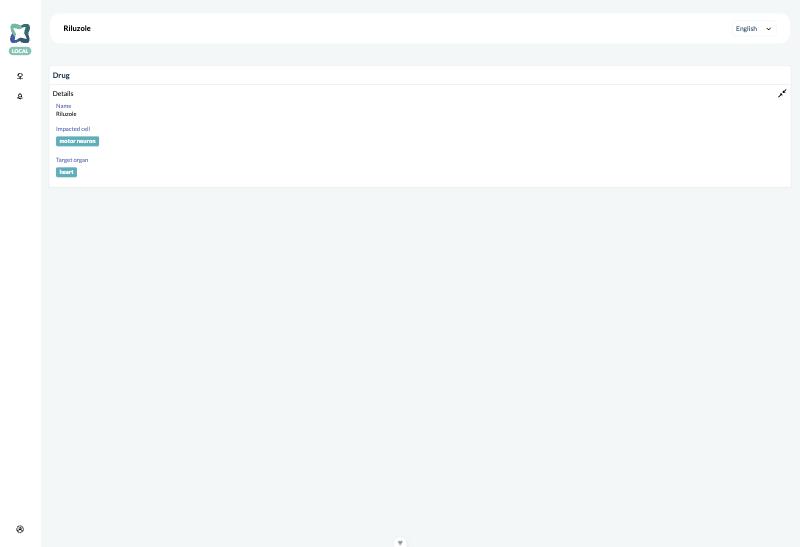
In a running DiSHACLed client against Ubergraph, through the GraphQL query the dropdown sends: a search for "motor neuron" returns the Cell Ontology's motor neurons, "heart" the organs of Uberon. A drug linked to one of each shows them by their label, and each item's own page (/<type>/<id>) shows its label and IRI. Typing in the dropdown in edit mode was not exercised in the browser: the test client ran without login.
Complex paths: view and edit symmetry
In SHACL, sh:path can be a path expression rather than one property: a sequence (( ex:address ex:cityName ), the city of the person's address), an alternative ([ sh:alternativePath ( dct:title rdfs:label ) ], the title under either property) or a repetition ([ sh:zeroOrMorePath ex:hasPart ], all parts at every level). Following such a path to read values is straightforward; writing through it is not: which triple does a change apply to, and what if an intermediate node (the address) does not exist yet? SHACL 1.2 UI therefore sets its expectations by difficulty:
| Path | View | Edit |
|---|---|---|
| Predicate and inverse | MUST | MUST |
| Complex paths | SHOULD, but may be left out to keep view and edit symmetric | — |
| Alternative | — | SHOULD (choose which predicate to write) |
Sequence, *, +, ? | — | MAY (ambiguous, may need intermediate nodes) |
Elody keeps view and edit symmetric: a field it shows on the detail page is a field it can edit, and an Elody field reads and writes one metadata key or one relation of one entity. Complex paths are therefore left out of a declaration, with a note, as the specification allows. In Elody's own model a sequence path usually means a field of a related entity, an alternative path one concept under several metadata keys, and a repetition a hierarchy — the hierarchy element, not a field, is where Elody shows that.
Findings for the specification
These points came up while implementing the draft. They are worth raising with the W3C Data Shapes Working Group (the conformance page lists them too):
- The scoring graph uses a SHACL 1.2 list as the value of
sh:datatype(( rdf:langString rdf:dirLangString )). A SHACL Core validator does not understand it; Elody rewrites it to ansh:orof the datatypes when it loads the graph. - The scores for "the property has this datatype among the permissible datatypes" test
sh:datatypewithsh:hasValue. A property whosesh:datatypeis a list, such as the "alt labels" column in the spec's ownshui:ValueTableViewerexample, therefore gets no datatype score at all. - Language resolution lets
sh:languageInwin over the application's language, while the specification's own example says the French label is shown "unless the application has been configured to use a different language". Elody follows the normative text. - Label property resolution makes
sh:namethe default in every step of a property label, so a predicate'srdfs:labelin an ontology only counts whenshui:labelPreferencelists it. Elody follows the text.
Reproduce
The pipeline and this documentation are generated from elody-generator (at the root of elody-common):
bash
cd elody-generator
scripts/showcase.sh <pwa checkout on feat/storybook> ../elody-docs/docs/public/images/shacl-ui
npx tsx scripts/showcase-docs.ts showcase-out ../elody-docs/docs/services/elody-frontend/shacl-uiThe value-preservation round trip stores an entity and three related ones, reads it through baseGraphql, saves it from the detail page with the PWA's own form code (a metadata edit and a relation edit) and compares what collection-api holds afterwards, on both sides of each relation, with the original:
bash
scripts/roundtrip/roundtrip.sh <pwa checkout with node_modules>showcase.sh needs a running local Elody stack (it copies the documents into the dashboard container and executes them there against baseGraphql) and Storybook from the PWA's feat/storybook branch on port 6016. Both scripts use the baseGraphql the container mounts; BASEGRAPHQL names another directory as the container sees it, e.g. a worktree of a feature branch under modules/. The spec's examples and scoring graph are vendored in elody-generator/spec/; refresh them when the draft changes.
Where the pieces live
| Piece | Location |
|---|---|
elody: vocabulary and meta-shapes (what a declaration may say) | elody-ontology/ui/ (own repository, at the root of elody-common) |
| Implementation bindings (GraphQL literals, widgets, schema fields) | elody-generator/ontology/elody-ui.bindings.ttl |
| Scoring system | elody-generator/src/score.ts |
| SHACL UI shapes → Elody declaration | elody-generator/src/fromShacl.ts |
Declaration → GraphQL (elody-ui generate, check, migrate) | elody-generator/src/ |
| Spec examples and scoring graph | elody-generator/spec/ |
| Value-preservation round trip | elody-generator/scripts/roundtrip/ |
| Relation mirroring (opt-in) | collection-api/api/object_configurations/relation_mirroring.py |
Linked-data sources: from the shapes to sparqlSources.json | elody-generator/src/externalSources.ts |
Linked-data sources: SPARQL engine and SPARQL_SOURCES | collection-api/api/storage/sparqlstore.py, collection-api/api/sparql_sources.py |